
Asynchronous and Parallel Programming in C# .NET
Understanding Asynchronous and Parallel Programming: A Practical Guide

Context
Last week, I had an engaging conversation with my colleagues about Asynchronous and Parallel Programming during our coffee break. Even though these concepts have been around for a while, I noticed that many people still confuse the two. This inspired me to write this article to clarify the differences and explore how they can be applied in real-world scenarios, particularly in .NET applications.
Both Asynchronous and Parallel Programming aim to improve efficiency and speed up task completion. But are they the same thing? Let’s dive deeper to understand what they are, how they differ, and how to use them effectively.
Parallel Programming: Harnessing the Power of Multiple Cores
Modern devices, from laptops to smartphones, are equipped with multicore processors (dual-core, quad-core, octa-core, etc.). You can easily check how many cores your computer has by opening the Task Manager. Despite this advancement, many developers still write single-threaded applications, similar to how software was developed in the 1990s. This means they aren’t leveraging the full potential of their hardware. Imagine having a team of developers ready to work on multiple features, but you assign all the tasks to just one person while the others sit idle. That’s not efficient, right?
A Real-Life Example

Think of running a restaurant. When you first started, you had limited funds and couldn’t hire additional staff. You had to handle everything yourself—cooking, serving, and managing payments. As a result, you could only serve one customer at a time, limiting how many people you could serve in a day. Over time, as your business grew, you hired more staff: a chef, a waiter, and a cashier. Now, with a team of three, your restaurant can serve three times as many customers daily.
What exactly is Parallel Programming?
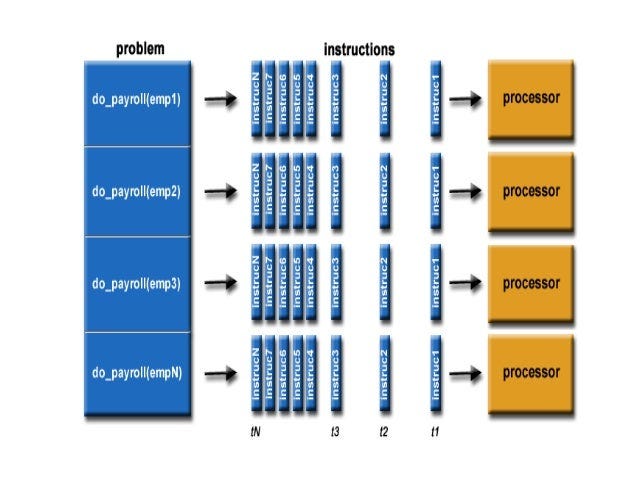
In simple terms, Parallel Programming involves using multiple cores (or even multiple machines) to execute tasks simultaneously. It breaks down a large task into smaller subtasks, assigns them to different processors, and executes them in parallel. This approach is widely used in devices like laptops, desktops, and smartphones to ensure tasks are completed quickly in the background.
Challenges of Parallel Programming
While powerful, Parallel Programming has its challenges:
Complexity: It can be difficult to learn and implement, especially for beginners.
Code Adaptation: Code often needs to be tweaked for different hardware architectures to optimize performance.
Power Consumption: Running multiple cores simultaneously can increase power usage, requiring better cooling systems.
Asynchronous Programming: Doing More with Less Waiting
Before diving into Asynchronous Programming, let’s first understand its counterpart:

Synchronous Programming. Returning to the restaurant example, imagine customers complaining about slow service. Upon investigation, you realize that customers often order multiple items (a drink, starter, main course, and dessert) but have to wait until everything is ready before they can start eating. This is Synchronous behavior. To improve the customer experience, you instruct your staff to serve each dish as soon as it’s ready, rather than waiting for the entire order. This change makes customers happier and is an example of Asynchronous service.
How Does This Apply to Programming?
In Synchronous Programming, tasks are executed one after another. Each task must complete before the next one begins. This can lead to inefficiencies, especially in applications with a single UI thread. For example, if a task blocks the UI thread, the application may freeze, displaying a spinning wheel or a "not responding" message. This creates a poor user experience.
In contrast, Asynchronous Programming allows tasks to run independently. Instead of waiting for one task to finish before starting the next, tasks are initiated and run in the background. This approach makes better use of system resources, prevents the UI from freezing, and improves overall performance.
Challenges of Asynchronous Programming
Task Synchronization: If one task depends on the completion of others, you’ll need a mechanism to coordinate them.
Concurrency Issues: Shared resources (e.g., a list being written to by one task and read by another) must be managed carefully to avoid conflicts.
Unpredictable Task Order: Tasks may finish in any order, making it harder to predict the flow of the program.
Are Asynchronous and Parallel Programming the same?

While both aim to improve efficiency, they are not the same. Parallel Programming focuses on dividing a task into smaller parts and executing them simultaneously across multiple cores. Asynchronous Programming, on the other hand, is about initiating tasks and allowing them to run independently, often in the background, without blocking the main thread.
For example, JavaScript is a single-threaded language but supports asynchronous patterns like callbacks, promises, and async/await. These patterns allow JavaScript to handle multiple tasks efficiently without true parallel execution.
Implement Asynchronous and Parallel Programming in C# .NET
Both paradigms are well-supported in C# .NET. Here’s a brief overview:
Asynchronous Programming Model (APM): Introduced in .NET 1.0, but complex to implement.
Event-Based Asynchronous Pattern (EAP): Simplified asynchronous programming in .NET 2.0.
Task Parallel Library (TPL): A significant improvement introduced in .NET 4.0, making parallel programming easier and more efficient.
Async and Await Keywords: Added in C# 5.0, these keywords simplify writing asynchronous code. The compiler handles the complexity, allowing developers to focus on logic.
Best Practices for Async Methods
Use the
asynckeyword in the method signature.End the method name with
Async(a convention, not a requirement).Return
Task,Task<T>, orvoid.Use the
awaitkeyword to wait for the result without blocking the main thread.
Conclusion
In this article, we explored the basics of Asynchronous and Parallel Programming, using real-life examples to illustrate their differences and benefits. While both approaches help us complete tasks faster by utilizing idle resources and reducing wait times, they serve different purposes and come with their own challenges.
There’s still much more to learn, such as handling concurrency issues, task cancellation, exception handling, and task coordination. But for now, I hope this article has clarified the distinction between these two powerful programming paradigms and inspired you to explore them further in your projects.